Showing posts with label Basic Networking. Show all posts

20120215

How to Choose a Router for Your Business :: Session II


VLAN Support to Separate Traffic


Most business-class networking gear supports virtual LANs, which allow you to create multiple separate virtual networks inside a single network. You can, for example, create one VLAN for your private network (or more to support different departments) and another for public access by visitors; this arrangement prevents the guests from connecting to your computers or snooping on your traffic.
You can create VLANs on your router, gateway, or firewall, and then you can assign each ethernet port to a VLAN (and one to the SSID, if it’s wireless too). If you’re also using a separate switch that supports VLAN, you can assign each of its ports to a VLAN.
Multiple SSIDs to separate Wi-Fi traffic: Business-class wireless access points and wireless routers typically support multiple SSIDs, in what is basically a wireless variant of a VLAN. You can create multiple network names to broadcast from a single access point or wireless router, each with its own wireless and security configuration. Then you can assign each SSID to a VLAN.
Guest Access to Secure Private Traffic
Wireless guest access to secure private traffic: Some of the more advanced consumer-level wireless routers have a guest feature, which uses VLANs and multiple SSIDs to create a separate Wi-Fi network for visitors. This is a great way to quickly and easily create a secondary wireless network, but typically it doesn’t allow configuration such as adding custom VLANs or assigning ethernet ports to the guest VLAN.

USB Port to Share Files or Printers

Some premium consumer-level wireless routers have a USB port so that you can plug in a USB flash drive or hard drive to share files on the network. Though you can always share folders to the network in Windows, sharing at the router provides a central storage location and doesn’t require a certain PC to remain powered on. But keep in mind that most routers offering USB port sharing require you to install software on the PCs in order to access the shared drive.
Business-class routers, gateways, and firewalls usually don’t have USB ports. To compensate for that, you can buy or create a separate component called a network-attached storage device. Your NAS can provide many more sharing features, including native sharing, in which no software is required on PCs for you to access the storage, as well as the ability to control who has access to the shares.

Quality of Service Support to Prioritize Traffic

Most routers, gateways, and firewalls provide a Quality of Service feature that lets you prioritizenetwork traffic. You can, for example, give voice and video traffic (from VoIP phones or Skype, for instance) higher priority since they’re much more sensitive to lags than Web browsing and other traffic. Another example is giving a certain computer or device more priority than others, or less priority for guest access.
Even the majority of advanced consumer-level wireless routers have QoS settings, but business-class equipment may allow more customization and more sophisticated functionality.

RADIUS Server to Run Enterprise Wi-Fi Security

If your business has more than a dozen or so wireless computers and devices (including smartphones and tablets), consider using enterprise-class Wi-Fi security (WPA or WPA2 with 802.1X), which lets you create a unique username and password for each user that connects via Wi-Fi.
WPA2 security
The personal or pre-shared key (PSK) mode of WPA or WPA2 is easier to set up than the enterprise mode, but it isn’t ideal for business networks. It lets you create only a single password for the Wi-Fi network, which becomes an issue if a laptop, tablet, or smartphone is lost or stolen: If a computer or mobile device were to go missing, you would want to change the Wi-Fi password so that the thief couldn’t come to your location and connect, but that would mean changing the password on all of your other Wi-Fi computers and devices as well.

To use the enterprise mode of WPA or WPA2 security, however, you must have a RADIUS server, which handles the 802.1X authentication. You can set up your own with the open-sourceFreeRADIUS server if you’re a Linux administrator or if you purchase a Windows program such as Elektron. If you don’t want to run your own server, consider buying an access point with a built-in RADIUS server, such as from ZyXel. Alternatively, use a hosted RADIUS service if you don’t want to run one at all.

Content Filtering to Block Inappropriate Sites

Many consumer-level routers have a built-in feature to block specific sites, while more-advanced models and UTM gateways may have a more comprehensive filter to block adult sites, malware, and other inappropriate material automatically. However, don’t worry too much about this feature when choosing your router: You can always use the free OpenDNS service to provide filtering for your entire network on any router.

Routers on the Market
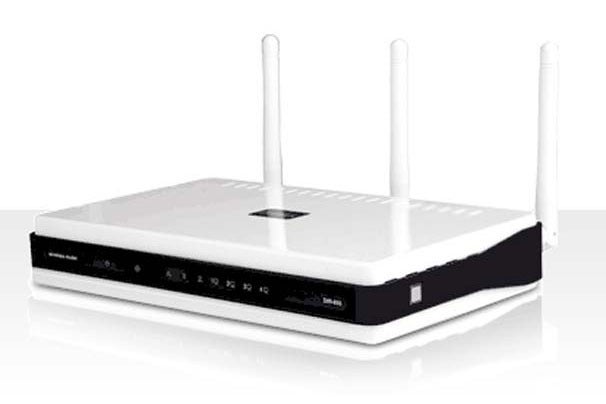
D-Link DIR-655 routerD-Link DIR-655 router
Smaller businesses can usually get away with using a consumer-level router. But if you require more functionality or security, consider a VPN router/firewall or a UTM gateway. Here's what several current router and gateway models offer.

  • D-Link Xtreme N Gigabit Router (DIR-655): This advanced consumer-level wireless router supports gigabit ethernet and sports a wireless guest feature, QoS settings, and a USB port for sharing a drive or printer.
  • Cisco Wireless Network Security Firewall Router (RV220W): In this business-class wireless router, you'll find dual-band Wi-Fi and gigabit ethernet. Additionally, it provides several VPN-server options, VLANs, and multiple SSIDs.
  • Netgear ProSecure UTM Firewall with Wireless N (UTM9S): A UTM firewall/gateway offering dual-band Wi-Fi and gigabit ethernet, this product provides antimalware and antispam functions, content filtering, and intrusion protection. It supplies dual WAN support, several VPN-server options, VLANs, and multiple SSIDs, too.
Finally, consider buying a consumer-level wireless router and uploading aftermarket open-source firmware such as DD-WRT to give it business-class features and to add customization. Or, purchase preloaded routers at a site such as Flash Routers.
Eric Geier is a freelance tech writer. Become a Twitter follower to keep up with his writings. He’s also the founder of NoWiresSecurity, which helps homes and businesses easily protect their Wi-Fi network with Enterprise (802.1X) security.Via[PCworld]
You might like:- Part-1 of  How to Choose a Router for Your Business

20120125

Packet Switching Basics


A packet is a block of user data, together with a protocol header which includes address and administration information, to be delivered to the correct destination by the switches or routers in the network. A message may be broken down into multiple packets and each packet is transmitted individually and can even follow different routes to its final destination. Once all the packets forming a message arrive at the destination, they are recompiled into the original message. This process is known as Packet Switching.
Two basic approaches are common to Packet Switching:
  • Virtual Circuit Packet Switching – An initial setup phase is used to set up a route between the intermediate nodes for all the packets passed during the session between the two end nodes. In each intermediate node, an entry is registered in a table to indicate the route for the connection that has been set up.
  • Datagram Switching – This approach uses a different, more dynamic scheme to determine the route through the network links. Each packet is treated as an independent entity and its header contains full information about the destination of the packet. The intermediate nodes examine the header of the packet and decide to which node to send the packet so that it will reach its destination.
Circuit-switching is often compared with packet-switching. The main difference in Packet Switching from Circuit Switching is that the communication lines are not dedicated to passing messages from the source to the destination. Circuit Switching is ideal when data must be transmitted quickly, must arrive in sequencing order and at a constant arrival rate. Thus, when transmitting real time data, such as audio and video when quality of service (QOS) is highly desired, a Circuit Switched network is often used. Packet Switching is more efficient and robust for data that is bursty in its nature and can withstand delays and jitter in transmission, such as e-mail messages and Web pages.
Most data network protocols such as Wide Area Network (WAN) protocols, including TCP/IP, X.25, and Frame Relay, are based on packet-switching technologies. Notably, the Internet is a packet-switched network, running the Internet Protocol (IP) over a variety of other network technologies. Newer mobile phone technologies such as GPRS and i-mode also employ packet switching. In contrast, the traditional telephone service is based on a circuit-switching technology, in which a dedicated line is allocated for transmission between two parties. The Asynchronous Transfer Mode (ATM) attempts to combine the best of both worlds—the guaranteed delivery of circuit-switched networks and the robustness and efficiency of packet-switching networks.

How to: Deploy Wireless Hotspot?


Public hotspots provide an easy method for customers to connect to the Internet. With the increasing number of people emailing, chatting, shopping, uploading and downloading files, surfing the web, and playing games across the Internet, wireless network access is an attractive draw for customers and could potentially lead them to choose one place of business over another. Business travelers can work from their hotel rooms, and special events staff can update schedules, locations, results, and specialized content to their customers without installing kiosks and having lines queued up waiting for a terminal to become available. Employees can work from a local coffee shop while enjoying a caf latte or cup of tea. These benefits offer a revenue opportunity for both the service provider and the owner of the site.
Functionally, a public hotspot is a readily available wireless network connection where users withcompatible wireless network devices such as PDAs, cell phones, notebook computers, or handheldgames can connect to the Internet, send and receive email, and download files all without beingencumbered by Ethernet cables. The hotspot can be temporary or permanent in nature: a trade showthat runs over 3 days or at a local coffee shop, respectively, but should always mimic the user'snative environment with respect to functionality and security. In other words, the hotspot should beinvisible to the user in every respect, other than making the initial connection to the network.
A hotspot is made up of some or all of the following components:
Some important features and functionality that a hotspot needs to provide are listed below:
  • Enabling access to the wireless link - Providing the mobile station with information about the wireless network - Creating an association with the mobile station - Providing access to the local network - Providing data packet transfer services - Disassociation from the mobile station
  • Provisioning the hotspot - Page redirection function - Mobile station authentication - User authorization
  • Layer 3 (IP) Address Management - Providing an IP address for the mobile device - Private to public address translation if necessary - Providing Domain Name Services (DNS) - Providing information about gateways
  • Providing access to hotspot LAN
  • Providing access to the WAN
  • Protecting user data privacy
  • Provide accounting information (keep track of user network usage)
Some of these functions are provided by a single hotspot network component while others are implemented through the collaboration or combination of two or more components.


Wireless hotspot network architecture

20120116

Easyway to Learn Protocol -Glossary Part-VI


10GBase-SW, as defined by IEEE 802.3ae, is mode of 10GBase-S for multimode fiber (MMF) with a 850-nm laser transceiver with a bandwidth of 10 Gbps. It can support up to a 300 meters cable length. The 10GBASE-SW media type is designed to connect to SONET equipment. 
Standard Organization: IEEE
Reference Document: IEEE 802.3ae

10GBASE-T is a standard proposed by the IEEE 802.3an committee to provide 10 Gigabit/second connections over conventional unshielded twisted pair cables (Category 5e or Category 6 or Category 7 cables). 10GBASE-T allows the conventional RJ-45 used for Ethernet LANs. 10GBASE-T can support signal transmision at the full 100m distance specified for LAN wiring.
Standard Organization: IEEE
Reference Document: IEEE 802.3an

10GBASE-ZR, supporting link lengths of up to about 80 kilometers on SMF, is a 10 Gigabit Ethernet specification that is not part of the IEEE 10 Gb Ethernet standard but is built according to Cisco optical specifications. 10GBase-ZR uses the 1550nm laser wavelength.
Standard Organization: IEEE
Reference Document: IEEE 802.3ae

10Broad36 is an obsolete standard for carrying 10 Mbit/s Ethernet signals over a standard 75-ohm CATV cable with a 3600 meter range.
Standard Organization: IEEE
Reference Document: IEEE 802.3

10-Gigabit Ethernet offers data speeds up to 10 billion bits per second over an Ethernet network. Built on the Ethernet technology, it offers similar benefits to those of the preceding Ethernet standard. 10-Gigabit Ethernet is used to interconnect local area networks (LANs), wide area networks (WANs), and metropolitan area networks (MANs). 10-Gigabit Ethernet uses the familiar IEEE 802.3 Ethernet media access control (MAC) protocol and its frame format and size. However, it supports full-duplex, but not half-duplex, mode and only functions over optical fiber. Therefore, it does not need the carrier-sensing multiple-access with Collision Detection (CSMA/CD) protocol used in other Ethernet standards.
Standard Organization: IEEE
Reference Document: IEEE 802.3ae+D687

1Base5 refers to an obsolete standard to carry 1 Mbps over unshielded twisted pair for StarLAN Ethernet.
Standard Organization: IEEE

2 Binary 1 Quaternary (2B1Q) is a full duplex physical layer encoding method used in ISDN and other digital communication technologies. In 2B1Q, two binary bits are encoded into one quaternary signal, doubling the effectiveness of transmission.
Standard Organization: ANSI
Reference Document: T1.601

Easyway to Learn Protocol -Glossary Part-V


10GBase-ER is a mode of 10GBase-E supporting a link length of up to 40 kilometers on single mode fiber (SMF based on G.652) using optical wavelength 1550nm. The 10GBASE-ER media types is designed for use over dark fiber.
Standard Organization: IEEE
Reference Document: IEEE 802.3ae

10GBase-EW is a mode of 10GBase-E supporting a link length of up to 40 kilometers on single mode fiber (SMF based on G.652) using optical wavelength 1550nm. 10GBASE-EW media type is designed to connect to SONET equipment. 
Standard Organization: IEEE
Reference Document: IEEE 802.3ae

10GBase-L, as defined by IEEE 802.3ae, is for single mode fiber (SMF based on G.652) with 1310 nm laser transceiver with a bandwidth of 10 Gbps. 10GBase-E allows optical signal transmission up to 10km. The 10GBASE-LR media type is designed for use over dark fiber, while the 10GBASE-LW media type is designed to connect to SONET equipment. 
Standard Organization: IEEE
Reference Document: IEEE 802.3ae

10GBase-LR is a mode of 10GBase-L supporting a link length of 10 kilometers on standard single-mode fiber (SMF) (G.652). 10GBASE-LR media type is designed for use over dark fiber.
Standard Organization: IEEE
Reference Document: IEEE 802.3ae

10GBase-LW is a mode of 10GBase-L supporting a link length of 10 kilometers on standard single-mode fiber (SMF) (G.652). 10GBASE-LW media type is designed to connect to SONET equipment. 
Standard Organization: IEEE
Reference Document: IEEE 802.3ae

10GBase-LX4, as defined by IEEE 802.3ae, uses wave division multiplexing technology to send signals over four wavelengths of light carried over a single pair of fiber optic cables. The 10GBASE-LX4 system is designed to operate at 1310 nm over multi-mode or single-mode dark fiber. The design goal for this media system is from 2 meters up to 300 meters over multimode fiber or from 2 meters up to 10 kilometers over single-mode fiber, with longer distances possible depending on cable type and quality. 
Standard Organization: IEEE
Reference Document: IEEE 802.3ae

10GBase-S, as defined by IEEE 802.3ae, is for multimode fiber (MMF) with a 850-nm laser transceiver with a bandwidth of 10 Gbps. It can support up to a 300-meter cable length. The 10GBASE-SR media type is designed for use over dark fiber, while the 10GBASE-SW media type is designed to connect to SONET equipment. 
Standard Organization: IEEE
Reference Document: IEEE 802.3ae

10GBase-SR, as defined by IEEE 802.3ae, is a mode of 10GBase-S for multimode fiber (MMF) with a 850-nm laser transceiver with a bandwidth of 10 Gbps. It can support up to a 300 meters cable length. The 10GBASE-SR media type is designed for use over dark fiber. 
Standard Organization: IEEE
Reference Document: IEEE 802.3ae

Easyway to Learn Protocol -Glossary Part-IV


10BaseT, also known as 10Base-T, is a transmission medium specified by IEEE 802.3i that carries information at rates up to 10Mbps in baseband form using unshielded twisted pair (UTP) conductors with low cost Level 3 or better UTP wiring up to 100 meters (328 ft.). 10BaseT uses RJ45 connectors and sometimes 50-pin AMP connectors to a patch panel. 
Standard Organization: IEEE
Reference Document: IEEE 802.3

10GBase is a set of standards as defined by IEEE 802.3ae for Gigabit Ethernet system to operate in full-duplex mode only, over fiber optic media. There are a few media types, which are designed for use in either local or wide-area networking. This provides the 10 Gigabit Ethernet system with the flexibility needed to operate in local area networks (LAN), metropolitan area networks (MAN), regional area networks (RAN) and wide area networks (WAN). IEEE 802.3ae provides support to extend the 802.3 protocol and MAC specification to an operating speed of 10 Gb/s. Several Physical Coding Sublayers known as 10GBASE-X, 10GBASE-R and 10GBASE-W are specified, as well as significant additional supporting material for a 10 Gigabit Media Independent Interface (XGMII), a 10 Gigabit Attachment Unit Interface (XAUI), a 10 Gigabit Sixteen-Bit Interface (XSBI) and management. 
The 10GBase includes 10GBASE-S, a 850nm wavelength serial transceiver which uses two multimode fibers; 10GBASE-L4, a 1310nm wavelength division multiplexing (WDM) transceiver which uses two multi-mode or single mode fibers; 10GBASE-L, a 1310nm wavelength serial transceiver which uses two single mode fibers; and 10GBASE-E, a 1550nm wavelength serial transceiver which uses two single mode fibers.
Standard Organization: IEEE
Reference Document: IEEE 802.3ae

10GBase-CX4 is a 10-gigabit Ethernet protocol using 4-laned copper InfiniBand connectors. 10GBase-CX4, developed by IEEE 802.3ak working group, is a lower-cost switch interface. 10GBase-CX4 uses the XAUI (10 Gigabit Attachment Unit Interface) specified in 802.3ae, and the 4X connector used for InfiniBand. Rather than attempt to transmit 10 gigabits over a single copper link, the 802.3ak specification uses four transmitters and four receivers operating differentially over a bundle of very thin twin-axial cables to transmit 2.5G bit/sec each at a baud rate of 3.125 GHz per channel with 8B10B coding. This requires four differential pairs in each direction for a total of eight twin-axial channels per assembly. 10GBase-CX4 can support a cable length up to 25-meter.
Standard Organization: IEEE
Reference Document: IEEE 802.3ak

10Gbase-E, as defined by IEEE 802.3ae, is for single mode fiber (SMF based on G.652) with 1550 nm laser transceiver with a bandwidth of 10 Gbps. 10GBase-E allows optical signal transmission up to 40km. The 10GBASE-ER media types is designed for use over dark fiber, while the 10GBASE-EW media type is designed to connect to SONET equipment. 
Standard Organization: IEEE
Reference Document: IEEE 802.3ae

Easyway to Learn Protocol -Glossary Part-III


100BaseTX, also known as 100Base-TX, is a 100-Mbps baseband Fast Ethernet specification using two pairs of either UTP or STP wiring, based on 4B/5B signal encoding. The first pair of wires is used to receive data, and the second to transmit data. To guarantee proper signal timing and quality, a 100BaseTX segment cannot exceed 100 meters in length. 100BaseTX is part of the 100BaseX as defined in the IEEE 802.3u standard. 
Standard Organization: IEEE
Reference Document: IEEE 802.3u

100BaseX, including 100BaseFX and 100BaseTX, is a 100-Mbps baseband Fast Ethernet specification based on IEEE 802.3 standard using 4B/5B block encoding for Fast Ethernet over fiber-optic cabling (FX) and two pairs (TX).
Standard Organization: IEEE
Reference Document: IEEE 802.3u

100VG-AnyLAN, originally developed by Hewlett-Packard, is a 100-Mbps Fast Ethernet and Token Ring media technology using four pairs of Category 3, 4, or 5 UTP cabling. 100VG-AnyLAN can be made to operate on existing 10BaseT Ethernet networks. 100VG-AnyLAN is defined in the IEEE 802.12 standard. 
Standard Organization: IEEE

10Base2, also called Cheapernet or ThinNet, is a 10-Mbps baseband Ethernet specification using a 50-ohm thin coaxial cable. 10Base2, defined in the IEEE 802.3a specification, has a distance limit of 185 meters per segment. 10Base2 is based on Manchester signal encoding transmitted over a thin coaxial cable. 
Standard Organization: IEEE
Reference Document: IEEE 802.3

10Base5, also called ThickNet, is a 10-Mbps baseband Ethernet specification using a standard (thick) 50-ohm baseband coaxial cable. 10Base5, which is part of the IEEE 802.3 baseband physical layer specification, has a distance limit of 500 meters per segment. 10Base5 is based on Manchester signal encoding transmitted
Standard Organization: IEEE
Reference Document: IEEE 802.3

10BaseF, also known as 10Base-F, is 10 Mbps Ethernet system based on Manchester signal encoding transmitted over fiber optic cable. 10BaseF includes 10BaseFL, 10BaseFB and 10BaseFP and is defined in IEEE 802.3j specification.
Standard Organization: IEEE
Reference Document: IEEE 802.3

10BaseFB, also called as 10Base-FB, is a 10-Mbps baseband Ethernet specification using fiber-optic cabling. 10BaseFB is part of the IEEE 10BaseF specification. It is not used to connect user stations, but instead provides a synchronous signaling backbone that allows additional segments and repeaters to be connected to the network. 10BaseFB segments can be up to 2,000 meters long (1.24 miles). 
Standard Organization: IEEE
Reference Document: IEEE 802.3

10BaseFL, also called as 10Base-FL, is a 10-Mbps baseband Ethernet specification using fiber-optic cabling. 10BaseFL is part of the 10BaseF specification and, while able to interoperate with FOIRL, is designed to replace the FOIRL specification. 10BaseFL segments can be up to 1,000 meters long if used with FOIRL, and up to 2,000 meters if 10BaseFL is used exclusively. 
Standard Organization: IEEE
Reference Document: IEEE 802.3

10BaseFP, also called 10Base-FP, is a 10-Mbps fiber-passive baseband Ethernet specification using fiber-optic cabling. 10BaseFP is part of the 10BaseF specification. It organizes a number of computers into a star topology without the use of repeaters. 10BaseFP segments can be up to 500 meters long. 
Standard Organization: IEEE
Reference Document: IEEE 802.3

Easyway to Learn Protocol -Glossary Part-I


1000BaseT, also known as 1000Base-T, is a physical layer standard that supports data transfer rates up to 1000 Mbps (1 Gbps) over twisted pair cables up to 100m. The 1000BASE-T standard is defined in the IEEE 802.3ab. Like Ethernet, 1000BaseT is based on the CSMA/CD LAN access method. 

Reference Document: IEEE 802.3ab

1000BaseX identifies various Gigabit Ethernet physical layer standards as defined in IEEE802.3z, such as 1000BaseLX, 1000BaseSX, 1000BaseCX and 1000BaseLH. Basically, all standards included in 1000BaseX uses 8B/10B coding scheme with 8 bits of data and 2 bits of error-correction data. Each specification allows various cable (fiber or copper) lengthes, and uses different cable media.

Reference Document: IEEE 802.3z

1000BaseZX (or 1000Base-ZX) is a Cisco specified standard for gigabit Ehternet communication. 1000BaseZX operates on ordinary single-mode fiber-optic link spans up to 43.5 miles (70 km). Link spans up to 62.1 miles (100 km) are possible using premium single-mode fiber or dispersion-shifted single-mode fiber. 1000BaseZX uses a long wavelength laser (1550 nm). The 1000BASEZX GBIC is intended to be used as a Physical Medium Dependent (PMD) component for Gigabit Ethernet interfaces found on various switch and router products. It operates at a signaling rate of 1250 Mbaud, transmitting and receiving 8B/10B encoded data.

Standard Organization: Cisco

100BaseFX, also known as 100Base-FX, is a 100-Mbps baseband Fast Ethernet specification. 100BaseFX, a part of 100BaseX defined in the IEEE 802.3 standard, uses 4B/5B block encoding for Fast Ethernet over fiber-optic cabling. The fiber distance that the 100BaseFX can support is: 412m half duplex on Multi Mode fiber, 2km full duplex on Multi Mode fiber, and 15-20km full duplex on Single Mode fiber.
Standard Organization: IEEE
Reference Document: IEEE 802.3

100BaseT, also known as 100Base-T or fast Ethernet, is a physical layer standard that supports data transfer rates up to 100 Mbps (100 megabits per second). 100BASE-T is based on Manchester signal encoding transmitted over Category 3 or better twisted-pair cable. The 100BASE-T standard is defined in the IEEE 802.3u. Like Ethernet, 100BaseT is based on the CSMA/CD LAN access method. 
Standard Organization: IEEE
Reference Document: IEEE 802.3u

100BaseT4, also known as 100Base-T4, is a 100-Mbps baseband Fast Ethernet specification using four pairs of Category 3, 4, or 5UTP wiring. To guarantee proper signal timing and quality, a 100BaseT4 segment cannot exceed 100 meters in length. 100BaseT4 is part of the IEEE 802.3 standard. 
Standard Organization: IEEE
Reference Document: IEEE 802.3

Easyway to Learn Protocol -Glossary Part-II


1000BaseCX or 1000Base-CX
1000BaseCX, also known as 1000Base-CX, is a physical layer specification for Gigabit Ethernet transmission over a special balanced 150 ohm cable shorter than 25m. This cable is a type of shielded cable. In order to minimize safety and interference concerns caused by voltage difference, both transmitters and receivers will share a common ground. The return loss for each connector is limited to 20db to minimize transmission distortions. The connector type for 1000Base-CX will be a DB-9 connector or HSSDC. 
Reference Document: IEEE 802.3z


1000BaseF or 1000Base-F
1000BaseF, also known as 1000Base-F, is a physical layer baseband specification for Ethernet communications over optical fibers. 1000Base-F uses 8B/10B ANSI X3T11 Fibre Channel FC-1 frame encoding, serializer/deserializer (SERDES) and NRZ on the fiber, clocked at 1250 Mbaud. 1000BaseF can support a fiber cable length of 500m full duplex on multimode fiber fiber, and of 2-3km full duplex on single mode fiber.

Reference Document: IEEE 802.3z

1000BaseLH or 1000Base-LH
1000BaseLH, also known as 1000Base-LH, is a physical layer specification for Gigabit Ethernet over fiber optic cabling as defined in IEEE 802.3z. LH stands for long haul, and 1000Base-LH uses long wavelength laser (1310nm) over multimode and single-mode fiber. 1000BaseLH can support a maximum distance of 550m for multimode fiber, and of 10km for single mode fiber. 

Reference Document: IEEE 802.3z

1000BaseLX or 1000Base-LX
1000BaseLX, also known as 1000Base-LX, is a physical layer specification for Gigabit Ethernet over fiber optic cabling as defined in IEEE 802.3z. LX stands for long wavelength, and 1000Base-LX uses long wavelength laser (1310nm) over multimode and single-mode fiber as opposed to 1000Base-SX, which uses short wavelength laser over multimode fiber. The maximum distance of fiber is 550m for multi mode and 5km for single mode. 

Reference Document: IEEE 802.3z

1000BaseSX or 1000Base-SX
1000BaseSX, also known as 1000Base-SX, is a physical layer specification for Gigabit Ethernet over fiber optic cabling as defined in IEEE 802.3z. SX stands for short wavelength, and 1000Base-SX uses short wavelength laser (850nm) over multimode fiber as opposed to 1000Base-LX, which uses long wavelength laser over both multimode and single mode fiber. The maximum distance of (multimode) fiber, based on 1000BaseSX, is 550m. 

Reference Document: IEEE 802.3z

Important Port Numbers Session III


network port number is the communication point between the computer and the computer network. All the information. The port number is backed up with TCP or UDP. The computer port number is defined in the transport layer of OSI reference model.

This is the continuation from the port numbers described in the previous posts.

1. Important port numbers 1

2. Important port numbers 2

Port number : Protocol :::: Aplication

111: TCP,UDP :::; SUNRPC protocol
113: TCP :::: ident - old server identificationsystem still used by IRC servers to identify its

115: TCP :::::SFTP, Simple File Transfer Protocol

117: TCP ::::::UUCP-PATH

118: TCP,UDP ::::::SQL Services

119: TCP ::::::::NNTP (Network News Transfer Protocol)
- used for retrieving newsgroups messages

123: UDP :::::NTP (Network Time Protocol) - used for time

135: TCP,UDP ::::::EPMAP / Microsoft RPC Locator Service

137: TCP,UDP :::::: NetBIOS NetBIOS Name Service

138: TCP,UDP ::::::NetBIOS NetBIOS Datagram Service

139: TCP,UDP ::::::NetBIOS NetBIOS Session Service

143: TCP,UDP:::::: IMAP4 (Internet Message Access Protocol 4)
used for retrieving E-mails

152: TCP,UDP ::::::BFTP, Background File Transfer Program

153: TCP,UDP ::::::SGMP, Simple Gateway Monitoring Protocol

156: TCP,UDP ::::::SQL Service

158: TCP,UDP ::::::DMSP, Distributed Mail Service Protocol

161: TCP,UDP::::: SNMP (Simple Network Management Protocol

162: TCP,UDP ::::: SNMPTRAP

170: TCP :::::::Print-srv

179: TCP ::::::BGP (Border Gateway Protocol)

194: TCP :::::IRC (Internet Relay Chat)

201/TCP,UDP :::::: AppleTalk Routing Maintenance